


.png)
The HubSpot Lead Scoring tool helps businesses identify and prioritize the leads most likely to become customers. Rather than relying on guesswork, HubSpot automatically assigns a score to each contact based on factors such as their demographics, website activity, email engagement, and other CRM data. This enables your marketing and sales teams to focus on the highest-value opportunities, improve conversion rates, and make more informed decisions throughout the customer journey.
By learning how the lead scoring tool in HubSpot works, you'll be able to shift your focus away from simply generating more leads toward focusing your efforts on finding the best qualified leads. This post provides an overview of the concepts of lead scoring, the process by which it is applied within HubSpot, and instructions for correctly implementing lead scoring in HubSpot.
Infini Digital is a certified HubSpot Partner and has extensive experience helping businesses implement HubSpot, configure lead scoring, and automate workflows to ensure that your HubSpot solution is appropriately configured to identify high-intent leads and deliver measurable results.
What Is Lead Scoring in HubSpot?
Lead scoring in HubSpot is a system that helps you rank and prioritize your contacts and companies based on their likelihood of becoming customers. It assigns points according to predefined criteria, allowing your marketing and sales teams to quickly identify the most qualified leads.
Positive actions, such as visiting your pricing page, submitting a form, or engaging with key marketing emails, increase a lead's score.
Negative signals, such as unsubscribing from emails or displaying low engagement, reduce it. The final score helps you determine which leads are ready to be handed over to sales and which require further nurturing before they're likely to convert.
Why Lead Scoring Matters
Lead scoring in HubSpot will help you in:
- Prioritizing follow-up with high-value leads instead of random outreach.
- Aligning marketing and sales using a single qualification standard.
- Identifying behaviour patterns that signal real buying intent.
- Automating actions like workflow triggers based on score thresholds.
Types of Lead Scores in HubSpot
HubSpot’s lead scoring tool helps you in creating different kinds of scores depending on what your business needs:
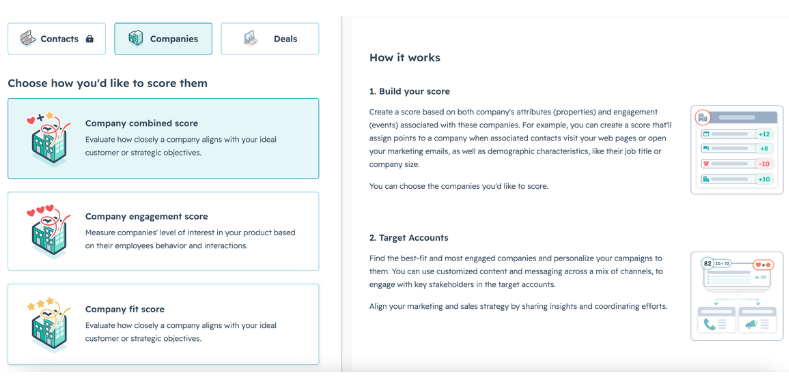
1. Engagement Scores
Engagement scores help in evaluating behaviour — how a lead interacts with your content, emails, web pages, or CTAs.
2. Fit Scores
These qualify leads based on who they are — job title, company size, revenue range, or other demographic properties.
3. Combined Scores
A mix of engagement and fit criteria, giving you a more holistic view of a lead’s quality and readiness to buy.
You can create multiple scores in HubSpot — so different teams (marketing, sales, product) you can also use the same baseline data for different purposes.
How the HubSpot Lead Scoring Tool Actually Works
Step 1: Decide What Criteria Matter Most
Start with the behaviours and properties that align with your buyer journey. Typical examples:
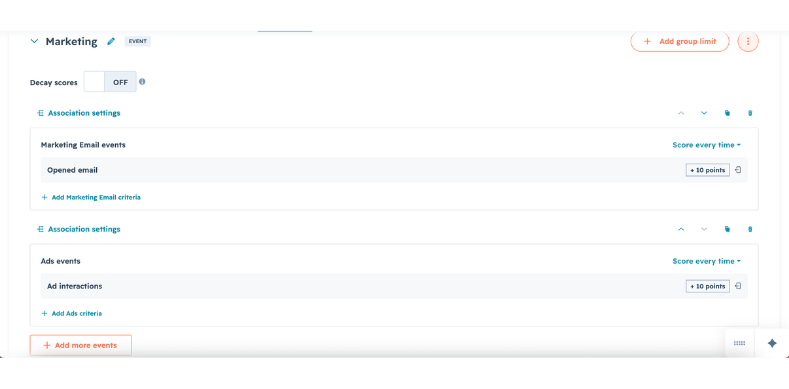
- +10 points when a lead visits product or pricing pages
- +15 points for filling out a sales inquiry form
- -20 points for unsubscribing from newsletter lists
These scores are customisable and reflect what your business values.
Step 2: Create Scoring Rules in HubSpot
In your HubSpot account:
- Navigate to Marketing > Lead Scoring.
- Click Create score and choose the object you want to score (contacts, companies, or deals).
- Choose whether the score is engagement, fit, or combined.
- Add criteria and assign points for each rule you want to include.
- Set minimum and maximum score limits — so your scoring system reflects priority levels.
Once this is set up, HubSpot begins calculating scores in real time as leads interact with your business.
Step 3: Turn Scores into Action
Lead scores become truly useful when they trigger actions:
- Automatically assign high-scoring leads to sales reps
- Trigger email workflows for mid-score prospects
- Segment leads by score to tailor messaging
- Report on lead score trends over time
Best Practices for Lead Scoring in HubSpot
Combine behavioural and demographic data
A lead that matches your ideal customer profile and shows strong engagement deserves a higher score.
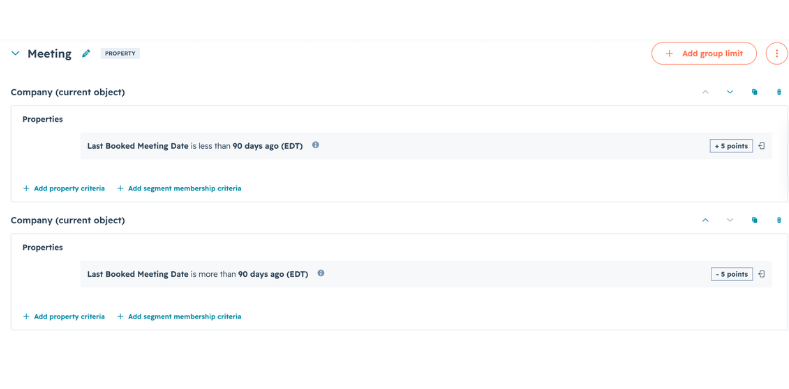
Group scoring rules into categories
Organise your scoring criteria into logical categories, such as Marketing, Sales, Events, Website Activity, or Company Fit. Grouping related rules makes your lead scoring model easier to manage, review, and optimise as your business evolves.
Use negative scoring wisely
Subtract points for disengagement or signals that suggest low fit — it helps refine who you prioritise.
Review and optimise regularly
Lead behaviour evolves. Quarterly reviews of your scoring criteria will keep your system effective and aligned with new trends.
Leverage analytics
Dashboards and reporting in HubSpot show which scores are converting most effectively — that means data-informed iterations.
Final Thoughts
HubSpot's lead scoring function is not just a way to quantify leads but rather is an effective solution to assist in determining where to invest time. Once implemented properly, it will create a proactive lead qualification/priority approach instead of a reactive lead acquisition approach. By using both behavioural cues and demographic fit, lead scoring will help decrease the length of your sales cycles, increase your conversion rates and create a more predictive engine for your business's growth.


%20What%20is%20lead%20scoring%20tool%20in%20HubSpot%20and%20how%20to%20use%20it%20in%202026.png)


.webp)
.webp)
.webp)